LED Indicator Panel
Overview
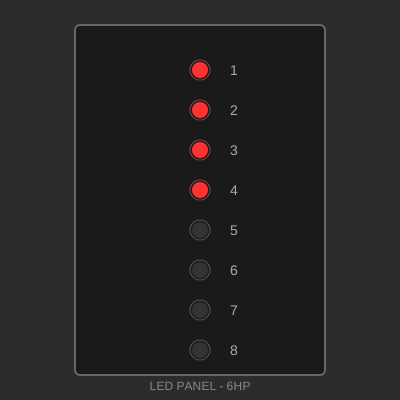
An 8-channel LED indicator panel for visual feedback and status monitoring. Features bright, easy-to-read LEDs in a vertical array configuration. Ideal for VU meters, status indicators, sequential displays, or binary readouts.
Specifications
- Size: 6 HP × 3U (30.48 mm × 128.5 mm)
- Depth: 25 mm (including PCB)
- Material: FR4 PCB (1.6mm thickness) with aluminum faceplate
- Finish: Black solder mask with white silkscreen
- Power Requirements: 5V DC, 200mA maximum
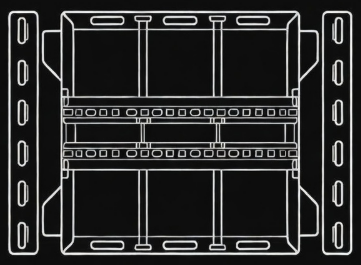
- Mounting: T-slot compatible with 4 mounting points (M5/M6 twist nuts)
Features
- Eight high-brightness LEDs (5mm diameter)
- Vertical array layout with even spacing
- Current-limiting resistors included on PCB
- Compatible with 3.3V or 5V logic
- Numbered indicators (1-8)
- Choice of LED colors (red, green, blue, yellow, white)
- Optional diffused window for softer appearance
Design Files
Design files will be available soon. This is an example panel for demonstration.
Example file structure: - PCB Gerber Files (ZIP) - Schematic (PDF/KiCad) - 3D Model (STEP) - Faceplate Design (DXF)
Bill of Materials
| Qty | Part | Description | Approx. Cost |
|---|---|---|---|
| 1 | PCB | FR4 1.6mm, 6HP×3U | $8.00 |
| 1 | Faceplate | Aluminum 1.5mm, laser cut | $10.00 |
| 8 | LED | 5mm, high-brightness | $4.00 |
| 8 | Resistor | 330Ω, 1/4W | $1.00 |
| 1 | Connector | 10-pin header, 2.54mm | $1.00 |
| 4 | M3 Screw | 8mm length, countersunk | $1.00 |
| 4 | T-slot T-nut | M5/M6 compatible with rail system | $2.00 |
| 4 | Spacer | M3, 3mm length (faceplate standoff) | $1.00 |
Total Estimated Cost: ~$28.00
Schematic
Each LED channel consists of:
Input Pin → 330Ω Resistor → LED (Anode) → LED (Cathode) → GroundInput voltage: 3.3V - 5V
Current per LED: ~20mA
Total current (all on): ~160mA
Pinout
Pin 1:  LED 1 Input
Pin 2:  LED 2 Input
Pin 3:  LED 3 Input
Pin 4:  LED 4 Input
Pin 5:  LED 5 Input
Pin 6:  LED 6 Input
Pin 7:  LED 7 Input
Pin 8:  LED 8 Input
Pin 9:  Ground
Pin 10: Ground (redundant)
Assembly Instructions
- PCB Assembly
- Solder resistors (R1-R8) on bottom of PCB
- Solder LEDs on top of PCB, observing polarity
- Flat edge of LED = cathode (negative)
-
Solder connector header on bottom of PCB
-
LED Testing
- Before installing faceplate, test all LEDs
- Apply 5V to each input with ground connected
-
Verify brightness and color consistency
-
Faceplate Installation
- Attach 3mm spacers to PCB mounting holes
- Align faceplate over LEDs
-
Secure with M3 screws from back
-
Panel Mounting
- Install T-slot twist nuts (M5/M6) in panel mounting slots
- Position panel on rail
- Insert and tighten mounting screws
- Connect input cable
Applications
- Audio: VU meter, level indicator
- Status Display: System health monitoring
- Binary Counter: Visual binary number display
- Sequencer: Step indicator for music or control sequences
- Process Indicator: Multi-stage progress display
- Network Activity: Port or connection status
- Sensor Display: Temperature, humidity, or other sensor ranges
Programming Examples
Arduino (Simple Control)
// Define LED pins
const int ledPins[] = {2, 3, 4, 5, 6, 7, 8, 9};

void setup() {
  for (int i = 0; i < 8; i++) {
    pinMode(ledPins[i], OUTPUT);
  }
}

void loop() {
  // Chase effect
  for (int i = 0; i < 8; i++) {
    digitalWrite(ledPins[i], HIGH);
    delay(100);
    digitalWrite(ledPins[i], LOW);
  }
}
VU Meter Mode
Connect to audio processor or use analog input with comparators for automatic level display.
Variations
- RGB LEDs: Use RGB LEDs for color-changing indicators
- Larger LEDs: 10mm LEDs for increased visibility
- Horizontal Layout: Rotate design for horizontal indicator bar
- Bargraph Display: Use LED bargraph components
- Digital Control: Add shift register for fewer input pins
License
This design is released under the MIT License.
Permission is hereby granted, free of charge, to use, copy, modify, and distribute this design for any purpose.
Author
Ranch Hand Robotics
GitHub: @Ranch-Hand-Robotics
Date: January 2026